

Searching for “solar accessories Nigeria” can bring up technical product names without explaining what each part does. It’s reasonable to wonder whether a cable, protection device or mounting component will suit your inverter and system design. A mismatch can affect how the parts work together.
The answer isn’t to buy every item on a generic checklist. Choose accessories by their role and compatibility with the complete system. This guide explains what common accessories do, what to compare before buying, and how to account for your power needs, likely outage duration and installation site.
You’ll also find practical checks for inverter and battery compatibility, protection, wiring and mounting. SolariQ designs and installs solar systems for homes and businesses across Nigeria, and provides after-sales servicing. Use this checklist to plan a setup with equipment selected to work together.
Key Takeaways
- Understand how solar accessories connect, protect, mount or help manage a system, and why each item should serve a clear purpose.
- Explore solar accessories Nigeria buyers may encounter by role, without assuming every system needs every type.
- Compare accessories against your system documentation and connected equipment, not product labels alone.
- Use a practical pre-installation checklist to organise equipment details, site considerations and installation plans.
- See how system design, installation and after-sales support can bring equipment together around your power needs and site.
Solar Accessories in Nigeria: Roles in a Complete System
A solar system needs more than equipment that generates and stores power. Supporting hardware connects its parts, helps protect electrical paths, secures equipment and manages how power moves through the setup. The right selection depends on the system design, connected equipment, installation site and intended use.
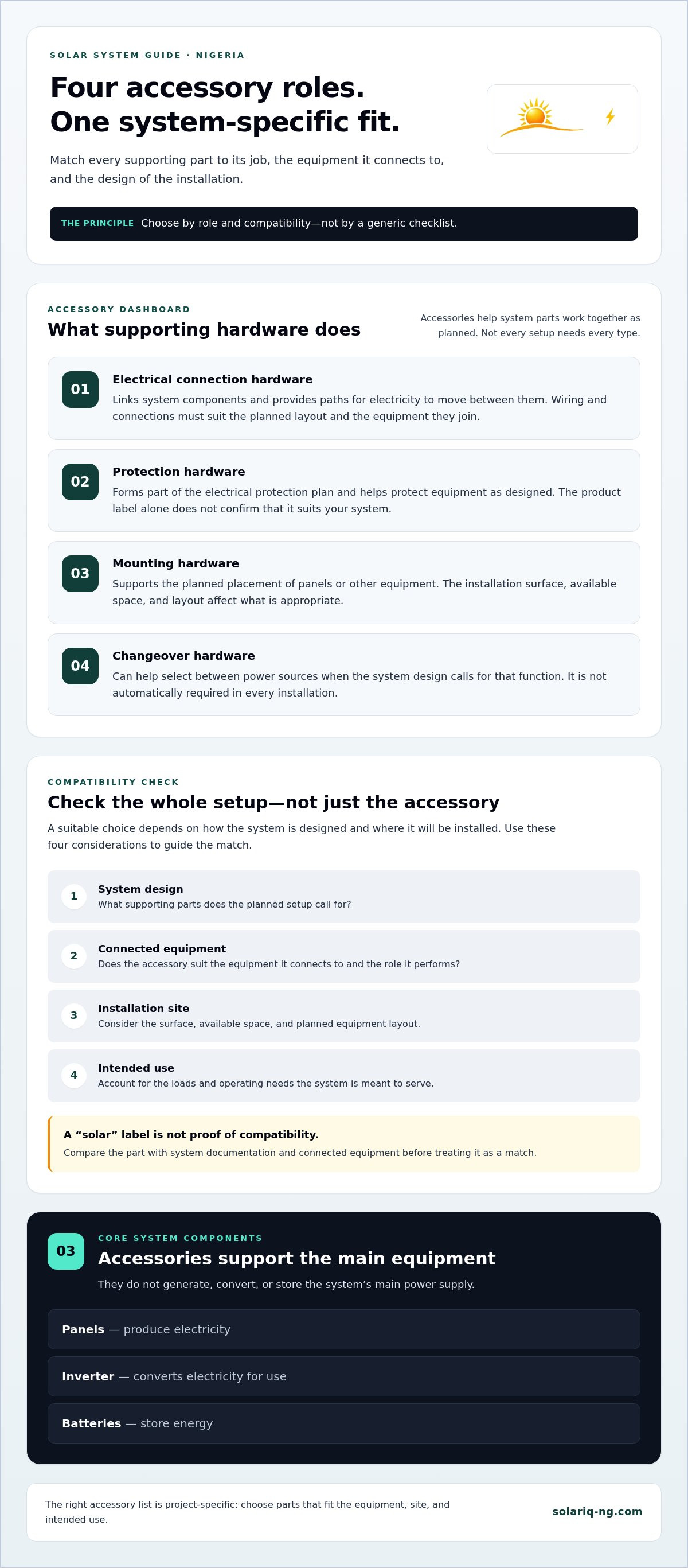
Solar accessories are supporting parts that connect, protect, mount or help manage a solar system. Unlike panels, inverters and batteries, they don’t generate, convert or store the system’s main power supply. Those core components have distinct jobs: panels produce electricity, an inverter converts it for use, and batteries store energy. Accessories help those parts work together as planned. A panel’s own construction is a separate topic, covered in this overview of the components of a solar panel.
What counts as a solar accessory?
The word “accessory” covers several kinds of supporting hardware. The label alone doesn’t explain what a part does, so start by identifying its job:
- Wiring and connection hardware carries power between panels, an inverter, batteries and the parts of a building that use electricity. It creates the electrical paths specified in the system design.
- Protection hardware helps guard the system’s electrical paths and equipment against conditions the selected devices are designed to handle. Its suitability depends on the system and connected equipment.
- Mounting hardware holds panels or other equipment in position. The installation surface, available space and planned layout affect what is appropriate.
- System connection hardware links or helps manage equipment as part of the designed setup. A changeover arrangement, for example, can help a site select between power sources when the system plan calls for it.
A home system may serve lighting, refrigeration or other household loads. A business may need power for different equipment and operating hours. These examples don’t create a standard shopping list: each project has its own requirements, and not every installation needs the same accessories.
Why accessory choices affect the whole system
A system is only as dependable as the connections between its parts. A connection that doesn’t suit the equipment or design can interrupt power flow. Poorly matched wiring or protection hardware can also create avoidable faults or leave equipment without the intended protection. A “solar” label alone doesn’t establish that a part fits your setup.
Check compatibility across the full system. Each accessory must suit the equipment it connects to and the role it performs. A home system serving one set of loads may need different supporting hardware from a business system with different equipment, layout or operating needs.
That’s why a project-specific design matters. It links accessory choices to the panels, inverter, battery, site and intended use, rather than treating each item as a separate purchase. For solar accessories Nigeria buyers, the useful question isn’t “Which accessories are essential for everyone?” It’s “Which supporting parts does this design require, and do they match the equipment they’ll serve?”
Solar Accessory Types: Match Each Item to Its System Role
Accessory names make more sense when you connect them to the job they do. A cable, mounting part or changeover switch isn’t a universal add-on. Each belongs in a particular place within a system, and the design determines whether it’s needed and how it should work with connected equipment.
- Electrical connection hardware: Links system components and provides paths for electricity to move between them.
- Protection hardware: Forms part of the system’s electrical protection plan and helps protect equipment as designed.
- Mounting hardware: Supports the planned placement of panels or other equipment at the installation site.
- Changeover hardware: Helps select between power sources where the system design calls for that function.
This is a guide to accessory roles, not a shopping list for every home or business. Some systems need particular types of hardware; others don’t. A broad overview of solar energy technologies can add context, but your equipment documentation and system design should guide choices for your setup.
Connection and mounting accessories
Wiring and connection hardware link the panels, inverter, battery and other parts included in a system. The wiring and connections must suit the planned layout and the equipment they join. A route across a roof or through a building can vary from one installation to another, so don’t choose wiring by appearance or a generic label alone.
Mounting hardware supports panel placement where the design requires it. The installation surface, available space and panel layout all affect the mounting approach. A home roof and a business site may have different placement needs, so account for those conditions before selecting parts.
Protection and changeover accessories
Protection hardware is part of a professionally designed electrical system. Its role is to support the protection plan for that setup’s equipment and connections. The label “solar protection” doesn’t establish whether an item suits the system. Consider its purpose and compatibility alongside the equipment documentation.
A changeover switch lets a system switch between power sources when the design uses that arrangement. It isn’t automatically required in every solar installation. Its place and function depend on the overall setup and how power is intended to be managed at the property.
For solar accessories Nigeria buyers, compare role first and compatibility second. Identify which components an accessory connects to, what job it performs and whether the system plan includes that function. Don’t add an item just because another installation uses one.
SolariQ designs and installs solar systems for homes and businesses, matching equipment to power needs, outage duration and site conditions. Explore solar system design and installation to bring accessory choices into the wider system plan.
How to Compare Solar Accessories for Compatibility
A product label can tell you an accessory’s name, but not whether it fits your system. Compare each item with the equipment it will connect to, the job it must perform and the conditions at the installation site.
Compatibility is a system-level decision because every accessory must suit the equipment, layout and intended use of the complete solar setup. Consider the inverter, panels, battery and supporting hardware together. A part that appears suitable on its own may not match the system design.
| Accessory role | Connected equipment | Design needs to compare | Installation context |
|---|---|---|---|
| Electrical connection | Panels, inverter, battery or other system components | What the connection links and the equipment documentation | Planned cable route and system layout |
| Protection | Equipment or electrical paths identified in the design | The protection function required for the setup | Where the item sits within the designed system |
| Mounting | Panels or other equipment that need support | Placement and mounting approach in the system plan | Available space and installation surface |
| Changeover | Power sources included in the planned arrangement | Whether the design calls for switching between sources | How the system will be used at the property |
Information to gather before comparing accessories
Start with accurate information, not guesses. Gather the inverter and battery details, panel arrangement, equipment you intend to power and a clear picture of the site layout. Note your expected outage duration and daily usage too. These details help shape a design around how the system needs to serve your home or business.
Use the equipment documentation as your reference. Compare details for the connected components with the accessory’s stated purpose and specifications. If a label doesn’t explain what an item connects to or does, it isn’t enough to judge compatibility. A system designer can use accurate equipment details to assess the setup as a whole. For more context on solar power in Nigeria, the Rural Electrification Agency provides information about its work in the sector.
How to spot a poor match
Pause if the accessory’s purpose is unclear, its documented details don’t align with the equipment, or the listing leaves out information needed to assess it. Appearance can’t show whether an item suits a particular setup. The lowest listed price can also distract from the more important question: does it perform the required role with the connected equipment?
For solar accessories Nigeria buyers, use this simple check: identify the role, identify the connected equipment, then compare both against the system plan and site. SolariQ designs solar systems around customer power needs, outage duration and site conditions. This brings accessory choices into the same plan as the inverter, panels and battery, instead of leaving you to assemble a system from unrelated product listings.
Solar Accessories Nigeria Buyers Can Review Before Installation
Before buying supporting hardware, clarify what the system needs to do and where it will be installed. This preparation helps you avoid collecting accessories that don’t fit the equipment or the way you plan to use it. Homes and businesses can have different power needs, equipment and site layouts, so a practical checklist is more useful than a fixed shopping list.
A four-step pre-purchase checklist
- Define what the system must support. List the appliances or business equipment you expect to run, when you use them and how long you need backup power during an outage. Daily usage and backup expectations help shape the system design and accessory requirements.
- Record the equipment details. Note the existing or planned inverter, panels and battery. Keep their documentation together, along with details about how the components will be connected. If you’re adding to an existing setup, record what is already installed rather than treating the new accessory as a standalone purchase.
- Review the site and layout. Consider where the equipment will sit, where panels are planned and how connections will run between system parts. Note available space and the installation surface. These details help inform mounting and connection choices.
- Match accessory roles to the design. Review the full system plan before purchasing. Identify which accessories the design calls for, what each one will connect to and what job it performs. Leave out items that don’t serve a defined role in the planned setup.
Keep the information accurate. A missing battery detail or unclear panel arrangement can make it harder to assess whether a supporting part fits. You don’t need to interpret every technical label yourself, but you do need to give the design process a reliable picture of the equipment and intended use.
Plan for installation and ongoing support
Installation planning should account for the actual property, not just the equipment list. The route between components, equipment placement and how the system will serve the household or business all affect the final arrangement. A professional system design brings these points together and reduces guesswork about accessory selection.
Think beyond the purchase, too. After-sales support gives you a route for help with the system after installation. Keep a record of the equipment and installation details so the setup is easier to discuss if you need servicing later. SolariQ provides solar system design, installation and after-sales servicing for homes and businesses across Nigeria.
Use this checklist before buying solar accessories Nigeria homeowners and businesses may need. For a system plan shaped around your power needs, outage duration and site, plan your solar system with SolariQ.
Plan a Complete Solar System with SolariQ
Accessories make sense as part of a system, not as isolated purchases. SolariQ sells solar equipment, including solar accessories, and designs and installs systems for homes and businesses across Nigeria. Accessory selection can therefore sit within a wider plan for the panels, inverter, battery and the way the property will use power.
From accessory selection to system design
A useful design starts with your needs. What equipment must the system support? How long should it provide backup during an outage? Where will the equipment and panels be installed? Your answers help shape the system plan and guide which supporting accessories fit its layout and purpose.
For a home, the design may need to reflect household routines and the appliances occupants rely on. A business may have different equipment, operating hours and site constraints. Accessory choices should follow those requirements, rather than a generic list or another property’s setup.
SolariQ brings equipment and installation planning together around power needs, outage duration and site conditions. This keeps accessory selection connected to the intended system, so each item has a defined role in the overall arrangement. The same approach applies whether you’re planning a new installation or considering how equipment fits into a broader system plan.
Get support beyond the purchase
Planning matters, and so does what happens after installation. SolariQ installs solar systems and provides after-sales servicing and support. Keeping the system’s equipment and design information together can make future servicing discussions clearer and keep the original plan in view.
SolariQ’s products and services are covered by a five-year warranty. Keep your purchase and system records so you can refer to them if you need support. Review the warranty information provided with your purchase for the applicable terms. The system design, installation and after-sales support also give you a practical path from choosing equipment to having a system installed and supported.
If you’re comparing solar accessories Nigeria options, bring the decision back to the complete system: what it needs to power, how long backup is needed and what the site allows. SolariQ can connect those needs to equipment selection and a project-specific design.
Ready to plan a system for your home or business? Discuss your solar system plan with SolariQ.
Make Your Next Solar Decision with Confidence
The next step isn’t adding more items to your basket. It’s turning your power priorities into a clear plan, so every purchase has a purpose and supports the way you expect to use electricity. Before you move ahead, think about what matters most to your household or business and what you want the system to handle.
That focus can make decisions about solar accessories Nigeria buyers face feel less like guesswork. Instead of comparing parts in isolation, consider the system as a whole and make decisions in context. A well-planned setup starts with your needs, then matches equipment and supporting hardware to them.
SolariQ helps customers take that next step with solar system planning, installation and support. Bring your goals into the planning process and work toward an arrangement that fits your property and intended use.
Talk to SolariQ about planning your solar system. A clear plan is a practical start toward greater confidence in your power setup.
Frequently Asked Questions
What accessories are needed for a solar power system?
The accessories needed depend on the system’s equipment and layout. A setup may use wiring and connection hardware, protection components, panel mounting hardware or a changeover switch. For example, a home adding a solar pump may need a different design from one serving household appliances. Think of solar accessories Nigeria buyers may need as parts selected for a specific function, not a fixed bundle that suits every installation.
Can I add solar accessories to an existing solar installation?
Yes, accessories can be added to an existing installation if they suit its equipment and design. Before buying, gather the inverter and battery details, panel arrangement and any available system documentation. For example, adding a component to an older setup may require reviewing how the existing parts are connected. A SolariQ system designer can use those details to assess how a new item fits the current arrangement.
Is every solar accessory compatible with every inverter?
No. An accessory’s purpose and documented specifications must suit the inverter and the other equipment it connects to. A label that says “solar” doesn’t establish compatibility. Compare the accessory information with the inverter documentation and system plan. If the item’s role or connection requirements are unclear, pause before purchase rather than assuming it will work because it is sold for solar use.
How do I know whether an accessory is suitable for my solar system?
Check the accessory’s stated function and specifications against your equipment documentation and system design. Identify which parts it will connect to and where it will be installed. Then consider whether the planned layout and intended use call for that function. If you’re unsure how the information fits together, share accurate equipment details with a SolariQ system designer before purchasing.
Do solar accessories come with a warranty in Nigeria?
SolariQ’s products and services are covered by a five-year warranty. Keep your purchase and system records so you can refer to them if you need support. Review the warranty information provided with your purchase for the applicable terms. Don’t assume that every accessory from every seller has the same warranty duration or coverage.
What happens if a solar accessory fails after installation?
If an accessory appears to fail, note what changed, when you noticed it and which system components are affected. Avoid assuming the accessory is the only cause, since a system symptom can involve connected equipment too. SolariQ provides after-sales servicing and support for installed systems. Share the relevant equipment and installation details so the issue can be considered in the context of the full setup.
How much do solar accessories cost in Nigeria?
Solar accessory prices vary by item, specifications and supplier, so there isn’t one reliable price for the category as a whole. Compare the exact item and its intended role rather than price alone. SolariQ handles equipment orders through WhatsApp, where customers can request current price, stock and delivery information for their location. Check that the item suits your system before making a purchase decision.


